300-Mile Amplified Indoor TV Antenna: HD & 4K Setup Tips
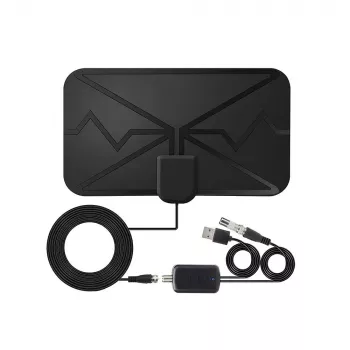
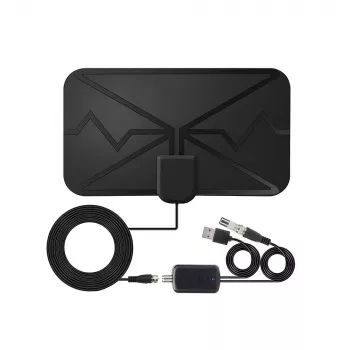
300-Mile Digital TV Antenna with Amplifier for Clear HD & 4K Channels
Cut the monthly bill and keep live local TV by using a powered indoor antenna designed to pull in over-the-air broadcasts. This amplified digital antenna is built for stable reception and crisp picture quality, with practical placement tips and troubleshooting steps to help get the most reliable signal in real rooms.
What this amplified antenna is designed to do
- Receives free over-the-air (OTA) broadcast channels when paired with a TV that has a digital tuner (ATSC).
- Amplifier helps overcome signal loss from longer coax runs, splitters, and indoor placement challenges.
- Supports modern broadcast resolutions, including HD and 4K where stations transmit it.
- Works as a straightforward alternative to cable for local news, sports, weather, and major network programming.
For a deeper overview of how antenna reception works (and why it can vary house to house), the FCC’s consumer guide is a solid reference: Federal Communications Commission: DTV Reception and Antennas.
Key features that matter for day-to-day reception
- Amplified signal path: helpful when the antenna must be placed farther from windows or when cabling is longer.
- Indoor-friendly form factor: makes it easier to test multiple spots (window, wall, higher shelf) without permanent mounting.
- Compatibility focus: intended for digital OTA broadcasts; streaming apps still require internet.
- Simple setup flow: connect coax, power the amplifier (if required), run a channel scan, then fine-tune placement.
Quick checklist before the first channel scan
| Item | Why it matters | What to do |
|---|---|---|
| TV tuner type | OTA channels require a digital tuner | Confirm the TV supports ATSC (or use an external tuner box) |
| Antenna location | Walls and metal can weaken signals | Start near a window or higher position, then test |
| Amplifier power | A powered amp won’t boost if unpowered | Plug in USB/power source if the model requires it |
| Channel scan | TV must detect channels for the current placement | Run “Antenna/Air” scan after every move |
| Coax connections | Loose fittings cause dropouts | Hand-tighten coax at TV and antenna/amp |
How to place an indoor antenna for the strongest signal
- Start with a window-facing position: exterior walls often reduce attenuation compared with interior walls.
- Go higher when possible: a higher shelf can outperform a lower placement even within the same room.
- Avoid interference zones: keep distance from Wi-Fi routers, large speakers, microwaves, and dense cable bundles.
- Minimize obstructions: metal blinds, foil-backed insulation, and large appliances can degrade reception.
- Retest after changes: a small rotation or a 1–2 foot move can materially change the channel lineup.
If you want a quick way to estimate where your local transmitters are and what direction to aim toward, tools like AntennaWeb can help you understand tower locations before you start moving the antenna around.
Amplifier basics: when it helps and when it doesn’t
- Helps most when: coax runs are long, splitters feed multiple TVs, or the best placement is far from the TV.
- May not help when: signals are already strong (amplification can overload and cause pixelation or missing channels).
- If channels break up: try turning off/isolating the amplifier (if possible) or repositioning the antenna to reduce overload.
- Use quality coax and avoid unnecessary adapters: clean signal paths often outperform “more gain.”
A common real-world example: if a channel looks great at night but breaks up during the day, the issue may be changing interference in the neighborhood, not “range.” A careful placement that reduces reflections (even moving the antenna a foot) can outperform adding more amplification.
What “range” means in real homes
Factors that commonly change results
| Factor | Typical impact | Practical adjustment |
|---|---|---|
| Building materials | Concrete/brick/metal reduce signal | Try window placement or a higher floor |
| Multipath reflections | Pixelation or unstable channels | Shift antenna a small distance; change angle |
| Distance to towers | Fewer channels / weaker reception | Use amplifier, reduce splitters, optimize placement |
| Coax length & splitters | Added signal loss | Shorten runs; use fewer splits; ensure tight connectors |
| Indoor interference | Noise reduces usable channels | Move away from routers, USB hubs, and power bricks |
For more detailed transmitter data (including channel assignments and signal notes), RabbitEars.info is a widely used reference.
Setup steps for a clean first-time scan
When an indoor antenna may not be enough
Product option: 300 Miles Digital TV Antenna with Amplifier for HD & 4K Reception
If you’re looking for an affordable way to test OTA in an apartment, dorm, guest room, or secondary TV, the 300 Miles Digital TV Antenna with Amplifier for HD & 4K Reception is designed for amplified indoor reception. Like any indoor antenna, the biggest performance gains typically come from placement (window/higher shelf) and rescanning after each move.
At-a-glance details
| Item | Details |
|---|---|
| Product | 300 Miles Digital TV Antenna with Amplifier for HD & 4K Reception |
| Price | $5.82 |
| Availability | In stock |
| Link | View product |
More in-stock picks to round out your setup
- Carbon Fiber–Style Steering Wheel Cover with Honeycomb Anti-Slip Grip (a simple upgrade for daily driving comfort)
- 80 PSI Portable Bike Pump with Dual Valve & Tool Kit (handy for quick tire top-offs at home or on the go)
FAQ
Does an amplified antenna work with any TV?
It works with TVs that have an ATSC digital tuner and a coax antenna input. If you have an older TV without a digital tuner, an external ATSC tuner box can enable over-the-air channels.
Why do some channels appear after moving the antenna but disappear later?
Indoor reception can change due to reflections from walls and buildings, electronic interference, and even small antenna shifts. Secure the antenna once you find a good spot, keep it away from routers and power bricks, and rescan if you move it.
Should the amplifier always be on?
Not always. Amplification can help with weak signals or long coax runs, but in strong-signal areas it may overload the tuner and cause pixelation or missing channels—testing with and without amplification can improve stability.















Leave a comment